Chest opened
+${chestReward.xp} XP
Explorer
NOUVEAU ×${chestReward.collectible.quantity}
tapez pour fermer

See the monuments around you in AR Open chests in the app

Around Us is built for your phone — point your camera at the streets and discover the monuments and places around you in augmented reality. Around Us is built for your phone — chests unlock when you walk, explore and capture nearby places.

•

Enable Location

We need your location to show you interesting places around you

Discover nearby places

Find interesting locations and hidden gems around you

Precise directions

Get accurate directions and distances to places

Your location is never shared with other users. It's only used when you tap the location button.

Public library in Lund

Log in to your account

Start exploring — it's free

Trusted by 93,761 travelers worldwide

Continue with Google
Continue with Apple
or

We will send you a code to connect

By continuing, you accept our Terms and Conditions and our Privacy Policy

Check your inbox

We've sent a pincode in your inbox. Please enter the code below.

Public library in Lund

Public library in Lund, Public library in Lund, Sweden.

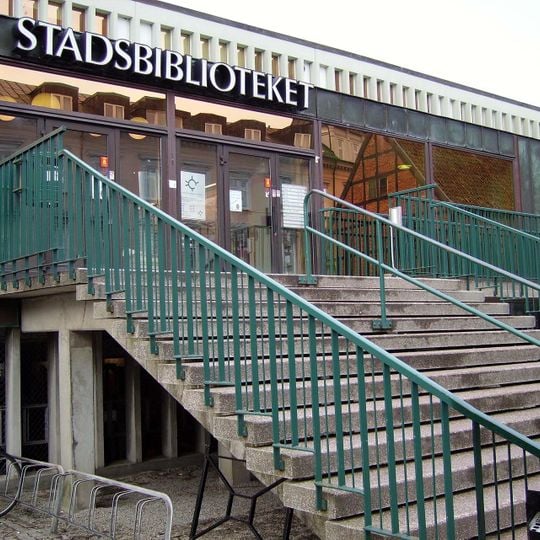
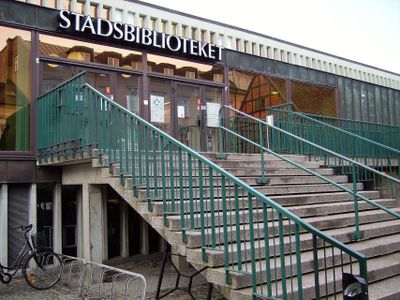
The Public Library of Lund (Stadsbiblioteket) occupies a building on Sankt Petri kyrkogata, designed by Flemming Lassen and opened in 1970. The facade has a wide staircase leading to a raised entrance, a dark sign band with white capital letters reading "STADSBIBLIOTEKET", and tall glass doors and windows with green metal frames beneath a flat roof edged with short vertical fins. Inside, the first floor holds the book collection and computers for loan, while the second floor is a quiet reading area; there is also a café.

The building was designed by Danish architect Flemming Lassen and built during a period when Lund was expanding its public education facilities. It was part of a broader Scandinavian effort to make libraries accessible to people of all social backgrounds.

The name Stadsbiblioteket simply means "city library" in Swedish. The building has two floors: the ground floor holds the collections and computers for loan, while the upper floor is a quiet reading area. A café is also inside the library.

The library is easy to reach on foot from the center of Lund, and a visit works well at any time of day. If you are coming by bike or car, it is worth checking the access routes in advance, as construction work in the area can occasionally affect the surroundings.

The library moved into the 1970 building on Sankt Petri kyrkogata, designed by the Danish architect Flemming Lassen, after decades in Lund's town hall. A renovation of the premises was carried out in 1999. The facade carries a dark sign band with white capital letters reading "STADSBIBLIOTEKET" above tall glass doors with green metal frames.

The community of curious travelers

AroundUs brings together thousands of curated places, local tips, and hidden gems, enriched daily by 93,761 contributors worldwide.
Start exploring
Architects
Flemming Lassen
GPS coordinates
55.70660,13.19138
Latest update
October 31, 2026 08:23
Reviews
Share your experience

No review yet

Discussions
Start a discussion...

No discussion yet

« Public library in Lund - Public library in Lund, Sweden » is provided by Around Us (aroundus.com). Images and texts are derived from Wikimedia project under a Creative Commons license. You are allowed to copy, distribute, and modify copies of this page, under the conditions set by the license, as long as this note is clearly visible.

Discover hidden gems everywhere you go!

From secret cafés to breathtaking viewpoints, skip the crowded tourist spots and find places that match your style. Our app makes it easy with voice search, smart filtering, route optimization, and insider tips from travelers worldwide. Download now for the complete mobile experience.

Around Us App Screenshot
❝

A unique approach to discovering new places❞

— Le Figaro

❝

All the places worth exploring❞

— France Info

❝

A tailor-made excursion in just a few clicks❞

— 20 Minutes

Around Us
Travel Guide & Maps
Download

Send to your phone

QR Code
1

Open the camera app on your mobile.

2

Point at the QR code with your camera. A notification will appear.

3

Tap the notification to open the link.