Chest opened
+${chestReward.xp} XP
Explorer
NOUVEAU ×${chestReward.collectible.quantity}
tapez pour fermer

See the monuments around you in AR Open chests in the app

Around Us is built for your phone — point your camera at the streets and discover the monuments and places around you in augmented reality. Around Us is built for your phone — chests unlock when you walk, explore and capture nearby places.

•

Enable Location

We need your location to show you interesting places around you

Discover nearby places

Find interesting locations and hidden gems around you

Precise directions

Get accurate directions and distances to places

Your location is never shared with other users. It's only used when you tap the location button.

Android sculptures

Log in to your account

Start exploring — it's free

Trusted by 94,048 travelers worldwide

Continue with Google
Continue with Apple
or

We will send you a code to connect

By continuing, you accept our Terms and Conditions and our Privacy Policy

Check your inbox

We've sent a pincode in your inbox. Please enter the code below.

Android sculptures, Group of sculptures at Googleplex, Mountain View, US

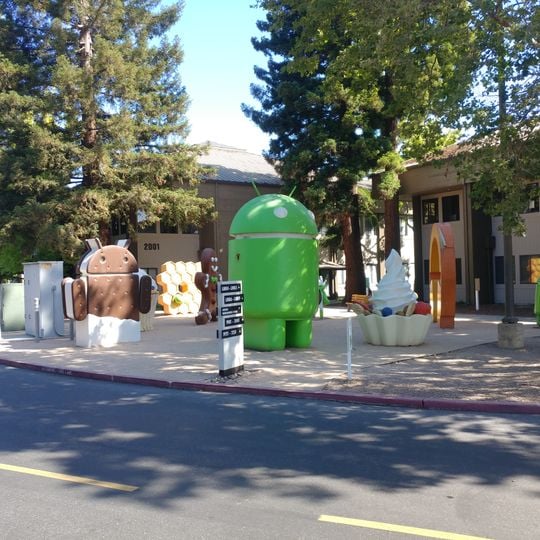
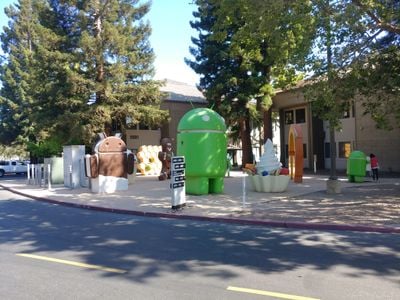
Android Sculptures is a group of large foam figures on a paved area at Charleston Rd and Huff Ave in Mountain View, California. The figures include a green upright android with a domed head and two antennae, a brown ice-cream-sandwich android with a bitten edge, a honeycomb slab, a gummy-bear shape, an ice-cream cone and a tall orange arch. A white sign on a black post reads "ANDROID" above "2001".

The first figures appeared in 2008 when Google began celebrating each new Android release with a physical sculpture on its campus. The tradition ended in 2019 after the company changed its naming strategy for the software.

Each statue is named after a dessert codename, chosen in alphabetical order from Cupcake (2009) onward; Android 1.1 was internally called Petit Four. Google dropped dessert names publicly with Android 10 in 2019, yet the 11 and 12 figures still refer to Red Velvet Cake and Snow Cone. The white sign beside the group reads "ANDROID" and "2001".

The campus area is accessible during daytime hours and the figures stand outdoors, allowing photography in all weather conditions. The easiest access is through the visitor center area, where you can also see other parts of the grounds.

The green Android once stood beside Alex, a dog-shaped toy chair by Eero Aarnio, stolen in 2009. In 2012 heat popped off the Jelly Bean statue's head and a jelly bean inside was taken, prompting engineer Dan Morrill to ask people not to steal them.

The community of curious travelers

AroundUs brings together thousands of curated places, local tips, and hidden gems, enriched daily by 94,048 contributors worldwide.
Start exploring
Location
Accessibility
Wheelchair accessible
Subject
android, candy, code name
Made from material
plastic
GPS coordinates
37.41840,-122.08797
Latest update
October 25, 2026 19:23
Reviews

Real people, real opinions — but not verified.

Share your experience
jeff
jeff · Mar 28, 2025
1
Discussions
Start a discussion...

No discussion yet

« Android sculptures - Group of sculptures at Googleplex, Mountain View, US » is provided by Around Us (aroundus.com). Images and texts are derived from Wikimedia project under a Creative Commons license. You are allowed to copy, distribute, and modify copies of this page, under the conditions set by the license, as long as this note is clearly visible.

Discover hidden gems everywhere you go!

From secret cafés to breathtaking viewpoints, skip the crowded tourist spots and find places that match your style. Our app makes it easy with voice search, smart filtering, route optimization, and insider tips from travelers worldwide. Download now for the complete mobile experience.

Around Us App Screenshot
❝

A unique approach to discovering new places❞

— Le Figaro

❝

All the places worth exploring❞

— France Info

❝

A tailor-made excursion in just a few clicks❞

— 20 Minutes

Around Us
Travel Guide & Maps
Download

Send to your phone

QR Code
1

Open the camera app on your mobile.

2

Point at the QR code with your camera. A notification will appear.

3

Tap the notification to open the link.