Chest opened
+${chestReward.xp} XP
Explorer
NOUVEAU ×${chestReward.collectible.quantity}
tapez pour fermer

See the monuments around you in AR Open chests in the app

Around Us is built for your phone — point your camera at the streets and discover the monuments and places around you in augmented reality. Around Us is built for your phone — chests unlock when you walk, explore and capture nearby places.

•

Enable Location

We need your location to show you interesting places around you

Discover nearby places

Find interesting locations and hidden gems around you

Precise directions

Get accurate directions and distances to places

Your location is never shared with other users. It's only used when you tap the location button.

Ginkgo tree of Zenpuku-ji

Log in to your account

Start exploring — it's free

Trusted by 93,173 travelers worldwide

Continue with Google
Continue with Apple
or

We will send you a code to connect

By continuing, you accept our Terms and Conditions and our Privacy Policy

Check your inbox

We've sent a pincode in your inbox. Please enter the code below.

Ginkgo tree of Zenpuku-ji

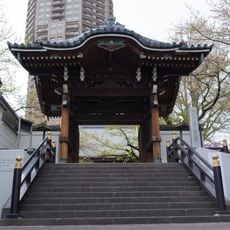
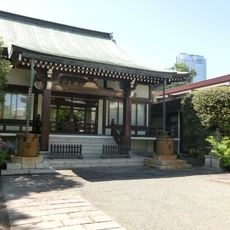
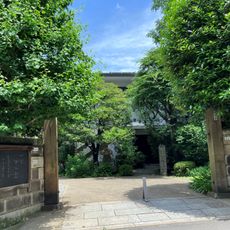
Ginkgo tree of Zenpuku-ji, Sacred ginkgo tree and natural monument in Moto-Azabu, Minato, Japan

The Ginkgo tree of Zenpuku-ji is a towering specimen reaching over 20 meters high, with aerial roots hanging from its branches that create a distinctive drooping pattern. The tree commands attention from the moment you enter the temple grounds due to its remarkable size and form.

According to temple tradition, the tree grew from the walking staff that the monk Shinran planted in the ground when he left Zenpuku-ji in 1229. It was designated a national natural monument on 10 October 1926. In the US air raid of 25 May 1945 the main hall burned down and the tree lost its upper trunk, but it sprouted again near the base.

The tree is called Sakasa-Ichō ("upside-down ginkgo") or Otsue-Ichō ("staff ginkgo") because, by tradition, Shinran planted his walking staff in the ground here in 1229 and it took root. A stone marker reading "Founder's Staff Ginkgo" and a bronze statue of Shinran stand beside it. A legend links it as a sibling tree to the ginkgo of Kōfuku-ji in Shinagawa, grown from a branch that the monk Ryōkai received from Zenpuku-ji.

The tree stands within the grounds of Zenpuku-ji at 1-6-21 Moto-Azabu, Minato, about 300 metres or a five-minute walk from Azabu-Juban Station on the Toei Oedo and Tokyo Metro Namboku lines. A stone marker inscribed "Soshi Shonin On-tsue Icho-ju" and a bronze statue of Shinran stand beside it.

The tree displays a remarkable ability to recover from severe injury and destruction. This resilience turned it into a symbol of renewal and hope in local history.

The community of curious travelers

AroundUs brings together thousands of curated places, local tips, and hidden gems, enriched daily by 93,173 contributors worldwide.


Start exploring
Location
Height
20 m
Part of
Seven Mysteries of Azabu
GPS coordinates
35.65333,139.73333
Latest update
October 28, 2026 15:39
Reviews
Share your experience

No review yet

Discussions
Start a discussion...

No discussion yet

« Ginkgo tree of Zenpuku-ji - Sacred ginkgo tree and natural monument in Moto-Azabu, Minato, Japan » is provided by Around Us (aroundus.com). Images and texts are derived from Wikimedia project under a Creative Commons license. You are allowed to copy, distribute, and modify copies of this page, under the conditions set by the license, as long as this note is clearly visible.

Discover hidden gems everywhere you go!

From secret cafés to breathtaking viewpoints, skip the crowded tourist spots and find places that match your style. Our app makes it easy with voice search, smart filtering, route optimization, and insider tips from travelers worldwide. Download now for the complete mobile experience.

Around Us App Screenshot
❝

A unique approach to discovering new places❞

— Le Figaro

❝

All the places worth exploring❞

— France Info

❝

A tailor-made excursion in just a few clicks❞

— 20 Minutes

Around Us
Travel Guide & Maps
Download

Send to your phone

QR Code
1

Open the camera app on your mobile.

2

Point at the QR code with your camera. A notification will appear.

3

Tap the notification to open the link.