Chest opened
+${chestReward.xp} XP
Explorer
NOUVEAU ×${chestReward.collectible.quantity}
tapez pour fermer

See the monuments around you in AR Open chests in the app

Around Us is built for your phone — point your camera at the streets and discover the monuments and places around you in augmented reality. Around Us is built for your phone — chests unlock when you walk, explore and capture nearby places.

•

Enable Location

We need your location to show you interesting places around you

Discover nearby places

Find interesting locations and hidden gems around you

Precise directions

Get accurate directions and distances to places

Your location is never shared with other users. It's only used when you tap the location button.

Fort 2

Log in to your account

Start exploring — it's free

Trusted by 94,589 travelers worldwide

Continue with Google
Continue with Apple
or

We will send you a code to connect

By continuing, you accept our Terms and Conditions and our Privacy Policy

Check your inbox

We've sent a pincode in your inbox. Please enter the code below.

Fort 2, Military fort in Wommelgem, Belgium.

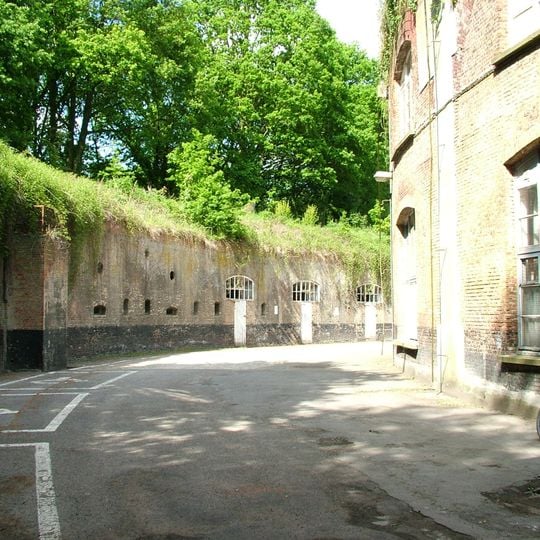
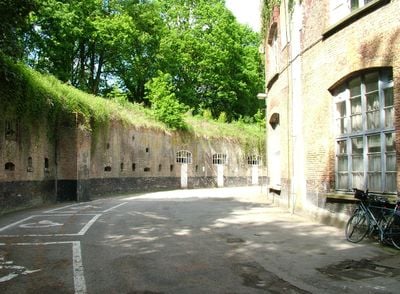
Fort 2 is a brick fort built in 1860-1864 with natural-stone details, its main front building carrying a monogram of King Leopold I. Its long, slightly curved dark brown and purple brick wall is capped by a vegetated earthen bank and pierced by a row of arched recesses and openings, with two wide barred arched doorways at the base and a third barred opening to their right. The wall ends at the right against a taller brick building with pale stone trim and barred windows.

Fort 2 was built in 1860-1864 for the Brialmont Belt, the ring of forts Henri Alexis Brialmont designed around Antwerp. Its plan is an adapted version of Fort 3 at Borsbeek, and a gun turret was planned on the reduit but never built. After the Second World War it served as a barracks and workshop for military vehicles. Wommelgem bought it in 1977.

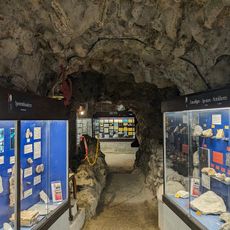
Five museums occupy the fort: the Brialmont Museum, a police museum, a musical instrument museum, the Sint-Elooi Museum, and museums on both World Wars with a section on V-weapons. A beekeeping station is also housed inside. Local socio-cultural associations use the site, and the municipality has owned it since 1977.

Visitors can explore the museum through scheduled guided tours that help navigate the site. Parts of the fort are used for local events and gatherings, so it is helpful to check access and available areas before your visit.

Fort 2 is the only fort in the Brialmont belt where a gun turret was planned on the reduit, but the design was never carried out. The main front building carries a monogram of King Leopold I. Since 1977 the fort has belonged to the municipality of Wommelgem, and around fifty bats are counted there each winter.

The community of curious travelers

AroundUs brings together thousands of curated places, local tips, and hidden gems, enriched daily by 94,589 contributors worldwide.
Start exploring
Location
Part of
national redoubt of Belgium
GPS coordinates
51.20250,4.49389
Latest update
October 31, 2026 18:38
Reviews
Share your experience

No review yet

Discussions
Start a discussion...

No discussion yet

« Fort 2 - Military fort in Wommelgem, Belgium » is provided by Around Us (aroundus.com). Images and texts are derived from Wikimedia project under a Creative Commons license. You are allowed to copy, distribute, and modify copies of this page, under the conditions set by the license, as long as this note is clearly visible.

Discover hidden gems everywhere you go!

From secret cafés to breathtaking viewpoints, skip the crowded tourist spots and find places that match your style. Our app makes it easy with voice search, smart filtering, route optimization, and insider tips from travelers worldwide. Download now for the complete mobile experience.

Around Us App Screenshot
❝

A unique approach to discovering new places❞

— Le Figaro

❝

All the places worth exploring❞

— France Info

❝

A tailor-made excursion in just a few clicks❞

— 20 Minutes

Around Us
Travel Guide & Maps
Download

Send to your phone

QR Code
1

Open the camera app on your mobile.

2

Point at the QR code with your camera. A notification will appear.

3

Tap the notification to open the link.